




CATEGORIES
- (3)AI & Technology
- (52)Accounting & Financial Reporting
- (1)Accounting for Income Tax
- (1)Assessed losses
- (38)Blogs
- (4)Business Advisory
- (8)Capital Gains Tax
- (1)Capital Gains Tax - Individuals Tax
- (1)Capital Gains Tax Implications of Trusts
- (2)Case study: Home office expense
- (1)Case study: Travel allowances
- (1)Company Formations
- (10)Compliance
- (141)Corporate Tax
- (15)Customs and Excise
- (2)Deceased Estate
- (1)Deductions Pre-trade and prepaid expenses
- (1)Deregistration
- (2)Employer and Employee (PAYE and UIF Specific)
- (1)Estate Duty
- (1)Events / Webinars
- (11)Faculty News
- (2)Farming
- (177)Individuals Tax
- (1)Input - Customs Duty
- (3)Interest
- (23)International Tax
- (1)Nature of the rights of beneficiaries
- (1)Notional input tax
- (10)Payroll
- (1)People & Practice Management
- (2)Practical Payroll
- (1)Professional Ethics
- (2)Provisional tax (Link with other Taxes)
- (4)SARS Issues
- (178)Tax Administration
- (2)Tax Administration Part 2B: Resolving Problems with SARS using the Tax Ombud
- (1)Tax Administration Part 3B Dispute Resolution - Objection and appeal
- (8)Tax Dispute Resolution
- (1)Tax Opinions
- (3)Tax Update
- (1)Tax implications of loans to trusts
- (1)Tax residence
- (1)Tax returns and payments
- (3)Transfer-Pricing
- (1)Trust Income / Gain Allocations
- (1)Trust types and income allocations
- (12)Trusts
- (88)VAT
- (3)VAT periods
- (1)Wear and tear allowances
- (14)Wills, Estates & Succession
- (1)Zero Rated
- (2)eFiling
- Show All

Resolving payroll submission and reconciliation failures
- 28 October 2026
- Compliance
- Dr Stiaan Klue
Source: TaxCafe, Carmen Westermeyer CA(SA), October 2026. Available on Webinar-on-Demand: TaxCafe with Carmen Westermeyer - October 2026
At a glance
|
Symptom |
Distinction to preserve |
Evidence to retain |
|
PDF will not generate |
Rendering versus submission failure |
Status, logs and accepted data |
|
EMP201 unavailable |
Access/profile issue versus liability |
Tax-type and period details |
|
Employee registration pending |
Request captured versus number issued |
Original request and response |
|
EMP501 appears complete |
Prepared versus accepted reconciliation |
SARS acknowledgement and balances |
A payroll file can balance internally while the South African Revenue Service (SARS) has not accepted the reconciliation. Conversely, a document-rendering problem may occur after the underlying submission has succeeded. Practitioners need to identify the failed stage before attempting repairs.
At the 23 October 2026 TaxCafe webinar, practitioners reported problems involving e@syFile version 8.0.2, generated documents, access to monthly employer declarations (EMP201) and employee registrations. These reports are tied to that date and version. Begin any repair with the installed version’s official instructions and the actual submission response.
Reconcile the payroll before troubleshooting the application
Employees’ tax arises under the Fourth Schedule to the Income Tax Act 58 of 1962. A software problem does not establish that no employees’ tax is due. Keep the payroll computation, payments and submission evidence as separate records so that a failure in one process does not obscure the others.
The employer reconciliation declaration (EMP501) should tie the employees’ tax certificates to the monthly declarations and payments, with differences explained. Check the employer reference, reconciliation period, certificate numbers and source codes before re-importing a file. A correctly formatted file can still contain an incorrect tax treatment or duplicate certificate.
Illustrative example. Payroll certificates total R300 000 of employees’ tax, monthly declarations total R300 000, and payments allocated to the employer account total R280 000. The R20 000 difference is not resolved by generating a PDF successfully. It requires investigation of unpaid amounts, payment allocation, reversals or other reconciling items.
Client conversation trigger: For every employer reconciliation, obtain a signed three-way reconciliation of certificates, declarations and allocated payments before the submission is approved.
Diagnose the actual point of failure
Record the application version, operating environment, tax reference, period, action attempted and error message. Determine whether the problem concerns importing, validating, submitting, receiving a response or displaying the resulting document. These stages require different evidence and may require different support channels.
Use current official instructions for updates, backups and migration. Repeatedly uninstalling software or importing the same file without preserving the database and submission history can create a second problem. A practitioner should be able to restore the last known valid records and identify which submission was accepted. SARS: e@syFile release notes.
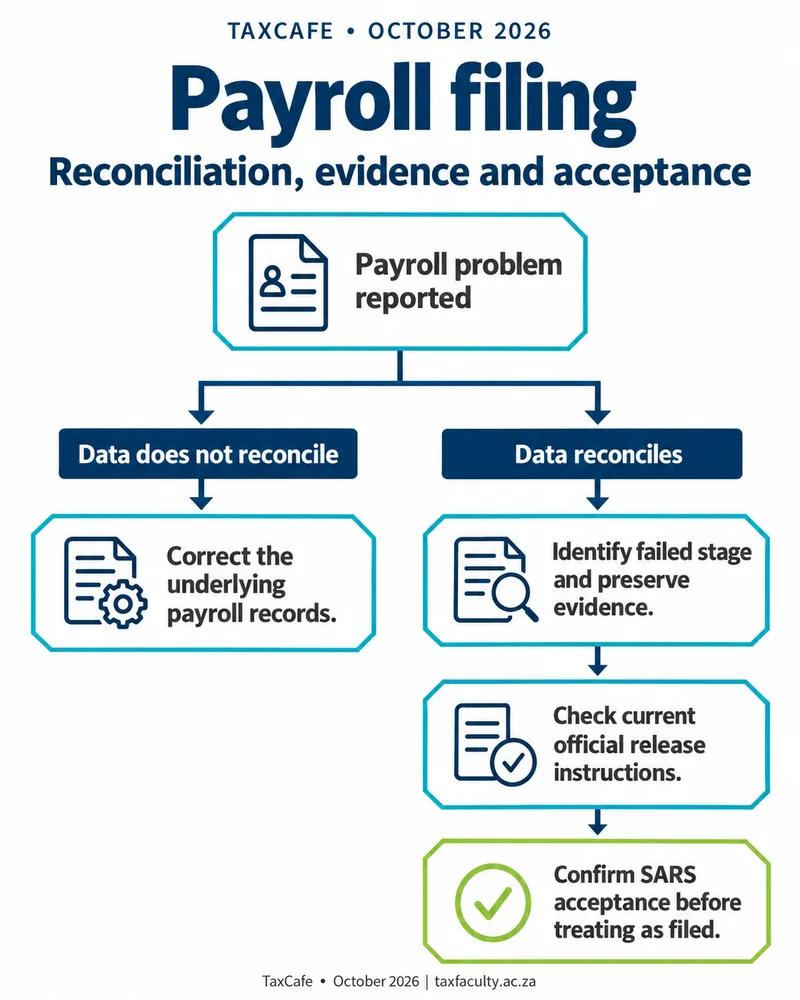
For a missing EMP201 function, check the employer’s registration, authorised access, tax-type activation and requested period. Do not create a second employer registration merely to restore a menu item. Where the deadline approaches, escalate the evidenced access problem and establish the available official submission route, while dealing separately with the payment obligation.
Client conversation trigger: Where an employer reports that “the return is gone”, obtain screenshots and registration details and establish whether the issue is access, period availability or a missing submission.
Manage employee registration and certificate exceptions individually
A pending employee tax-registration request should be tracked against the original identity details and submission reference. Repeated requests with altered identifiers can produce inconsistent records. Establish whether the employee already has a tax number, whether the identity information is correct and what response SARS has issued.
The employer should not invent a number or substitute another employee’s identifier to pass validation. Use the prescribed correction or enquiry process and document the unresolved case. The current certificate-submission requirements should guide any permitted treatment while registration is outstanding. SARS: completion and submission of employees’ tax certificates.
After correction, check the employer reconciliation against the employee certificate. A successful resubmission should replace or amend the intended record rather than leave two contradictory versions. The employer’s closing file should include acknowledgements, the final accepted totals, outstanding exceptions and the person responsible for each follow-up.
Client conversation trigger: Ask payroll teams to maintain an exception register for pending tax numbers and rejected certificates, with one owner and one documented resolution per employee.
Practitioner action checklist
|
# |
Area |
Issue |
Clients affected |
Action required |
Timing |
|
1 |
Reconciliation |
Three records must agree |
Employers |
Tie certificates, declarations and payments |
Before EMP501 |
|
2 |
Software |
Version-specific failures |
e@syFile users |
Preserve backup and exact error |
Before repair |
|
3 |
Access |
Missing EMP201 |
Affected employers |
Verify registration and period |
Immediately |
|
4 |
Employees |
Pending registrations |
Exception cases |
Track original request and correction |
Until resolved |
|
5 |
Completion |
Accepted versus prepared |
All submissions |
Retain final acknowledgement |
On filing |
Close the payroll submission only after the reconciliation is accepted and remaining exceptions have an identified owner. Preserve the response, final totals and corrected employee certificates as the completion record.
Related reading: Completing payroll deregistration for each tax type; Resolving retirement directives and missing transfer records; Determining the tax consequences of director loan accounts.
Frequently asked questions
Why was my EMP501 reconciliation not accepted by SARS?
A payroll file can balance internally while SARS has not accepted the reconciliation. Check the employer reference, period, certificate numbers and source codes before re-importing.
Does an e@syFile problem mean no PAYE is due?
No. Employees’ tax arises under the Fourth Schedule, and a software problem does not establish that no employees’ tax is due.
What should the EMP501 reconcile?
It should tie the employees’ tax certificates to the monthly EMP201 declarations and payments, with differences explained.
Build your expertise: to apply these principles in practice, explore The Tax Faculty’s Professional Certificate in Payroll Taxes and Administration.
About the author
Dr Stiaan Klue is Executive Dean and CEO of The Tax Faculty. He was the founding CEO of the South African Institute of Taxation (SAIT) and is the founding author of Silke on Tax Administration (LexisNexis).